Usage
Build the engines, run training and tuning, improve the dataset, and execute with a trained model.
This guide assumes the environment is already set up as described in the Setup page.
Main loop
Hyper-parameters and training artifacts are logged with MLflow. Start its server first:
cd AIAgent
poetry run mlflow server -h 127.0.0.1 -p 8080 --serve-artifacts
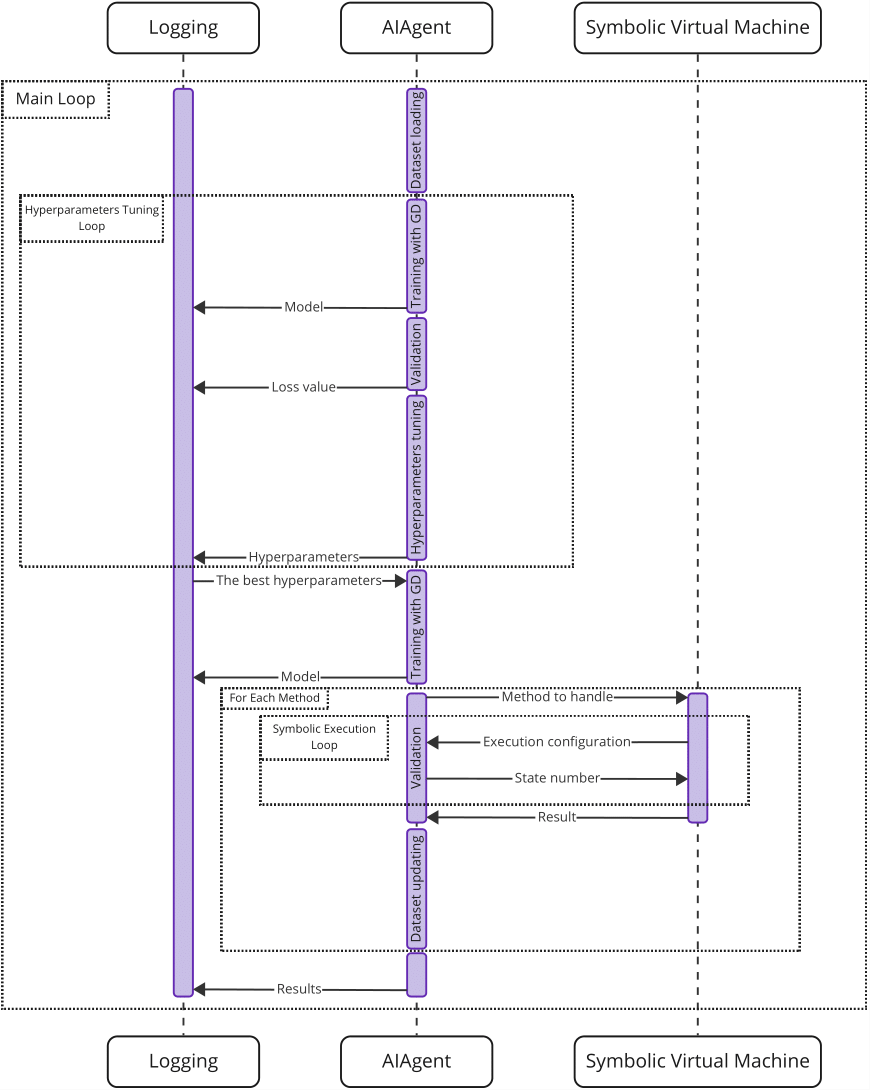
The training process is a main loop that alternates two kinds of runs: hyper-parameters tuning and dataset improvement with symbolic virtual machines. Before the loop, generate an initial dataset. Then alternate tuning and dataset improvement until the desired result is reached, and finally run symbolic execution with the trained model.
The point of alternating is mutual improvement: tuning yields the best network for the current dataset, and that network improves the dataset; a better dataset then has better hyper-parameters, so tune again.
Build symbolic virtual machines and maps
To build the symbolic virtual machines (V# and usvm) and the methods used for training, set up the toolchain as described in the Setup page, then run:
make build_SVMs build_maps
Optionally add new maps under maps/ and integrate another engine (see
Integrate a new symbolic machine).
Generate initial dataset
Supervised learning needs some initial data, which any path-selection strategy can produce. This project generates it with one of the strategies from V#:
make init_data STEPS_TO_SERIALIZE=<MAX_STEPS>
STEPS_TO_SERIALIZE is optional and defaults to 200. The initial dataset is
saved under ./AIAgent/report/SerializedEpisodes and is later updated by the
neural network when it finds a better solution.
Generation is deterministic: two runs with the same seed produce byte-identical serialized path conditions.
Hyper-parameters tuning
Hyper-parameters are tuned with Optuna. Tuning yields the best network for the current dataset, which gives a better chance of improving the dataset in the other kind of run.
Create a training configuration.
./workflow/config_for_tests.ymlis a template. To use the training loss as the tuning objective, set the validation config as follows:ValidationConfig: validation_mode: val_type: loss batch_size: <DEPENDS_ON_YOUR_RAM_SIZE>
Configure Optuna, for example:
OptunaConfig:
  n_startup_trials: 10
  n_trials: 30
  n_jobs: 1
  study_direction: "minimize"
The
TrainingConfigsection requires aseed. It makes the run reproducible: the dataset split, step sampling, validation map order, and model weight initialization are seeded with it, each trial re-seeds from a seed derived from (study seed, trial number), and the Optuna sampler is seeded with the study seed — so two runs of the same configuration produce identical splits, samples, and hyper-parameter suggestions.Each trial writes its artifacts to
report/trials/<trial_number>/(model weights, model kwargs, and the SVM statistics table for SVM validation), so parallel trials cannot overwrite each other; the study snapshotsstudy.pklandtrial.pklstay at the top ofreport/.Each trial also runs in its own MLflow run named after the trial number. After each trial finishes, the
study.pklandtrial.pklsnapshots are logged to that run together with abest_trial_numbertag holding the best trial among those completed so far;derive_dataset_improvement_config.pylocates the best trial’s artifacts through that tag.A trial stops early when its validation result stops improving. On early stop (or after the final epoch), the best checkpoint — the epoch with the best validation result — is restored into the model and exported, so the retained
model.pthand the highest-epoch<epoch>/model.pthMLflow artifact hold the best weights, and the trial’s value is that best result, not the last epoch’s.Move to the
AIAgentdirectory and run training:cd AIAgent poetry run python3 run_training.py --config path/to/config.yml
The entrypoints are CWD-independent: the artifacts always land under
AIAgent/and the config’s relative paths resolve against the config file’s own directory, so the command works from any directory (thecdonly locates the script).
Dataset improvement with symbolic virtual machines
The optimal sequence of symbolic execution steps is unknown, so the best models from the previous step are used to obtain relatively good ones:
Build the SVMs if you have not yet (see Build symbolic virtual machines and maps).
Using the workflow example as a template, create a configuration with the maps to use, or reuse an existing
maps/*/Maps/dataset.json.Create a configuration (server and training parameters), again using
./workflow/config_for_tests.ymlas a template. The improvement run must start from the tuning run’s best model, so the config needs two URIs: the best weights and the trial that produced them. Derive both from MLflow instead of copying them by hand — the script reads the server and experiment from the config’sMLFlowConfigsection and writes the config plus:cd AIAgent poetry run python3 derive_dataset_improvement_config.py \ --base-config path/to/config.yml --output-config path/to/derived.yml
weights_uri: mlflow-artifacts:/<EXPERIMENT_ID>/<RUN_ID>/artifacts/<EPOCH>/model.pth

OptunaConfig:
  ...
  trial_uri: mlflow-artifacts:/<EXPERIMENT_ID>/<RUN_ID>/artifacts/trial.pkl
The derived config’s path values are absolute (anchored against the base config’s directory), so it loads from any directory.
Move to the
AIAgentdirectory, launch the server manager, and run training with the derived config:cd AIAgent poetry run python3 launch_servers.py --config path/to/derived.yml poetry run python3 run_training.py --config path/to/derived.yml
The improvement run replays the frozen trial through a fresh study, enqueuing its hyper-parameters once per replay. It persists
study.pkl/trial.pkland the per-trial MLflow artifacts exactly like a tuning run, so the next round of the loop derives its config the same way.
SVM validation failure flag
The SVM validation section of the config (val_type: svms_model or
svms_each_step) has an opt-in fail_immediately flag, off by default.
When enabled:
a game that ends before all planned steps are played without reaching 100% coverage is marked as a failed map — the symbolic engine stopping that early is an engine defect, not a model quality issue; by default it only produces a warning; and
any failed map (timeout, engine error, …) fails the run with a non-zero exit.
SVM validation step metric
The steps_count reported per map (in the per-trial statistics table and in
the dataset Result) is the number of steps the model/agent played: the
server-reported total trace steps minus StepsToStart. The first
StepsToStart steps of a map are played by the default searcher (BFS/DFS)
before the model takes over — in svms_each_step mode the agent’s connection
is only used after that start phase, and in svms_model mode the server plays
the start steps itself before handing control to the ONNX model. Subtracting
them makes the metric identical across both validation modes for an identical
game outcome, so per-map statistics and early-stopping signals are comparable
regardless of the mode used.
Guide symbolic execution with a trained model
After training, choose the best MLflow-logged model and run symbolic execution:
Convert the PyTorch model to ONNX with
onyx.py(see ONNX conversion).Use the ONNX model to guide execution with your SVM (see Integrate a new symbolic machine), or use an existing engine extension in this repository:
Place the model at
GameServers/VSharp/VSharp.Explorer/models/model.onnx.Run:
dotnet GameServers/VSharp/VSharp.Runner/bin/Release/net8.0/VSharp.Runner.dll \
    --method BinarySearch \
    maps/DotNet/Maps/Root/bin/Release/net8.0/ManuallyCollected.dll \
    --timeout 120 --strat AI --check-coverage